
Fix a mistake
Nothing you declare is final. What is awkward is finding the control: it is always the same small pencil on a row, it always sits on the tab that owns the thing, and the application names the act with a different word each time.
Find it by what you got wrong
Section titled “Find it by what you got wrong”| What is wrong | Open | Hover the pencil and it says | The panel is headed |
|---|---|---|---|
| A held line: quantity, amount invested, fees, TER or entry date | the account’s Lines tab | Correct | Repair this line |
| A dated buy or sell order | the account’s Movements tab | Correct | Correct this lot |
| A cash operation: its label, amount or date | the account’s Movements tab | Edit | Edit operation |
| A balance you stated | the account’s Details tab | Repair | Balance history |
A lot is that dated order itself: one buy or one sell, with its quantity, its unit price and its fees. What a line holds, what it cost and the fees it paid are added up from its lots, so correcting one moves those three figures together.
Where each tab is
Section titled “Where each tab is”Open an account from the wealth screen, /patrimoine, and the bar above it carries its
tabs. Which ones are drawn depends on the account:
- a PEA, a securities account, a life insurance or a crypto wallet opens on Lines;
- every other account opens on Details instead;
- both then carry Movements and Settings, and Tax only where there is a latent gain to estimate.
Every line you hold, across every wrapper, is also listed together at /lignes, and the
pencil there opens the same panel.
The cash of a PEA or a securities account
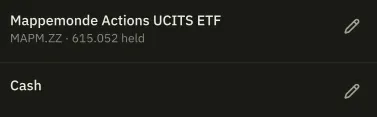
Section titled “The cash of a PEA or a securities account”A wrapper’s cash is not on the Details tab, because those accounts have no Details tab. It is a row named Cash at the bottom of the Lines table, and its pencil opens the cash history: “Every cash balance stated, with its date. The pencil corrects, the bin removes.”
What correcting does not touch
Section titled “What correcting does not touch”- Deleting a line keeps its price history and its dated lots.
- A balance is stored per day. Stating one on a new day adds a row and leaves the old ones readable; stating one for a day that already has a balance replaces that day’s.
- A quantity deduced from dated orders cannot be typed over. The panel says so and sends you to the Movements tab, which is where that number is made.
Archiving or deleting the whole account is a different act, and it lives on the account’s own Settings tab, not in the application’s settings.