
Dashboard
The dashboard is the application’s home, at /. Nothing is created here: it is four
readings of what you already hold, and one switch that belongs to no other page.
Net worth over time
Section titled “Net worth over time”The large card on the left carries the figure, the change over the period, and the curve. Four controls sit on it:
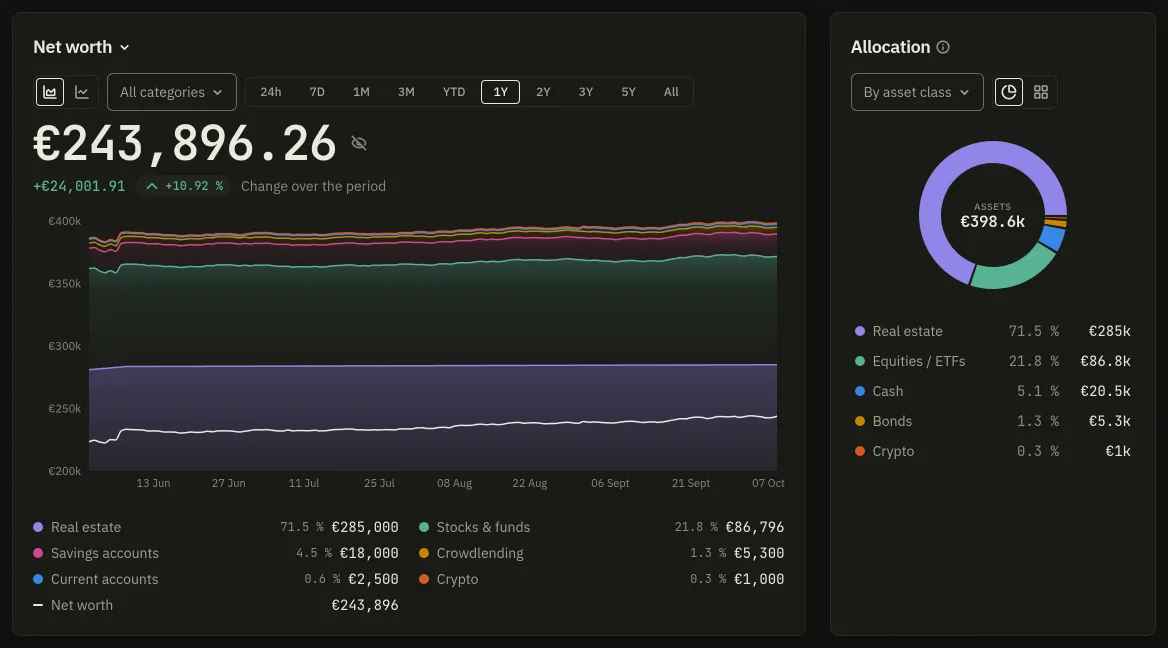
- Net worth / Gross worth. Net subtracts your loans and liabilities; gross does not.
- The period, as a row of ten chips: 24h, 7D, 1M, 3M, YTD, 1Y, 2Y, 3Y, 5Y and All. Ten everywhere, so the one you chose as your default in Settings is always selectable.
- Chart reading: Total as a curve, one line, or Composition by category, the same total split into bands. The second only appears where there is something to split.
- Categories shown. Ticking none means every category: the way back is the All categories entry above the list, not an eleventh box.
The change beside the figure takes your deposits and withdrawals back out before measuring: paying in €1,000 is not a gain of €1,000.
Allocation, then spending
Section titled “Allocation, then spending”The narrow card beside it splits what you own three ways (By asset, By asset type, By asset class) and draws it as a Pie or as Blocks. Debts are not in it: a slice cannot be negative, so the card says what the gap with net worth is instead.
Under both, a second ring reads Spending over the same period the curve is set to. The two rings are never side by side on purpose: one divides a stock, the other a flow, and beside each other they read as two halves of one split.
Key figures
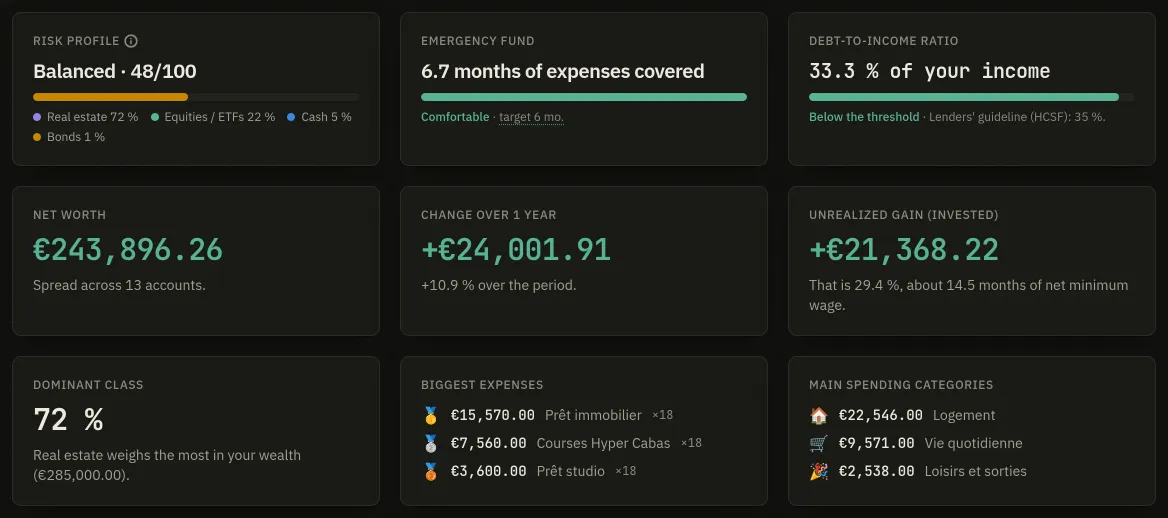
Section titled “Key figures”The grid at the foot holds up to ten tiles: net worth, change over the year, investment gain, allocation, top expense, top category, completeness, and three drawn from your investor profile. Customize turns each one off and on; the choice is stored on your account, and the button then reads Customize (3 hidden).
Hide amounts
Section titled “Hide amounts”It has two doors and they are one setting:
- the small eye beside the net-worth figure on this page;
- the Hide amounts entry in the user menu, at the foot of the sidebar.
Masking from the figure and then opening the menu finds the menu already offering Show amounts.
The choice is a preference on your account rather than a browser setting, so it follows you to another device, and it is read before the first paint: amounts are never drawn and then hidden.
First run
Section titled “First run”Until your first account exists this page is an empty state with an Add an account button. A Discover Badlen card sits above the cards until its steps are done; see Your first account.