
Accounts
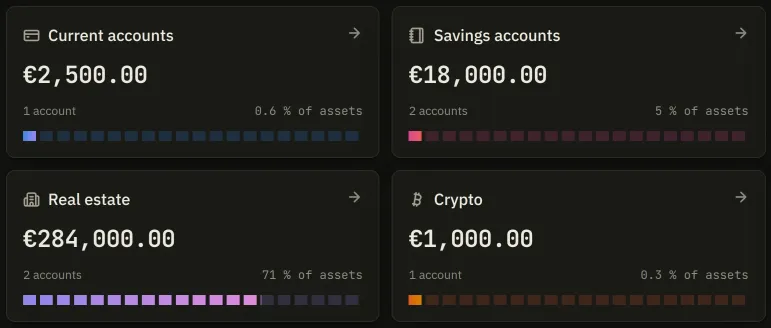
Wealth in the sidebar opens /patrimoine, the screen that lists what you own. It draws
one card per category, under two headings: Assets, then Liabilities if you hold
any. A debt is listed apart and counts towards none of the shares above it.
A category you hold nothing in has no card, and the sidebar does not nest it under Wealth either. Its address still answers, but you have to type it.
The ten categories
Section titled “The ten categories”Each card opens a page of its own, addressed by one French word:
| Page | Category | What files there |
|---|---|---|
/courant |
Current accounts | Checking accounts |
/livret |
Savings accounts | Passbooks, term deposits |
/investissement |
Stocks & funds | PEA, securities accounts, life insurance |
/immobilier |
Real estate | Property you own the walls of |
/crypto |
Crypto | Wallets |
/papier |
Paper real estate | REIT shares |
/crowdlending |
Crowdlending | Lending platforms |
/objets |
Objects & collections | Watches, metals, art |
/passif |
Loans / liabilities | What you owe |
/autre |
Other | Everything else |
The category is deduced from the type you picked when you created the account; you never choose it. A PEA files under Stocks & funds whatever you call it.
Inside a category
Section titled “Inside a category”A category page has two tabs. The first lists what the category holds, either Accounts or Properties for real estate, which draws a card per property rather than a table. The second, Movements, lists what has gone through it.
Above the table the first tab draws up to three blocks, and only where each has something to say: Performance over the period you pick, Breakdown by account as a ring, and Analysis (ongoing charges and sector split), which appears only once the category holds an account that carries securities.
Inside an account
Section titled “Inside an account”Clicking a row opens the account, at /<category>/compte/<id>. It has three tabs, or four:
- Lines on a PEA, a securities account, a life insurance contract or a crypto wallet; Details on an account whose whole value is a balance you typed. See Holdings.
- Movements: every cash operation, dated order and balance change on this account.
- Tax, drawn only when the account has a latent taxable gain to estimate.
- Settings, which is the account’s own, not the application’s. See Account settings.