
Your first account
An account in Badlen is a container: a current account, a savings passbook, a PEA, a life insurance contract, a crypto wallet, a loan. What it holds comes afterwards. Until one account exists, every page of the application is empty, and that is normal.
Not the account you sign in with: that one was created at First start and there is only ever one of it. This page is about the accounts your money is in, and you create as many as you hold.
Three ways in
Section titled “Three ways in”There is no Add entry in the left-hand menu. Three controls lead to the same screen,
/ajouter (the addresses on this page stay French whichever language the interface is
set to, as Appearance explains):
- the Discover Badlen card on the dashboard, at the row Add a first account;
- the Add an account button under the empty dashboard;
- the Complete your wealth button at the top of the wealth screen,
/patrimoine.
Pick the right tile
Section titled “Pick the right tile”The hub groups its tiles by what they create, and the difference matters:
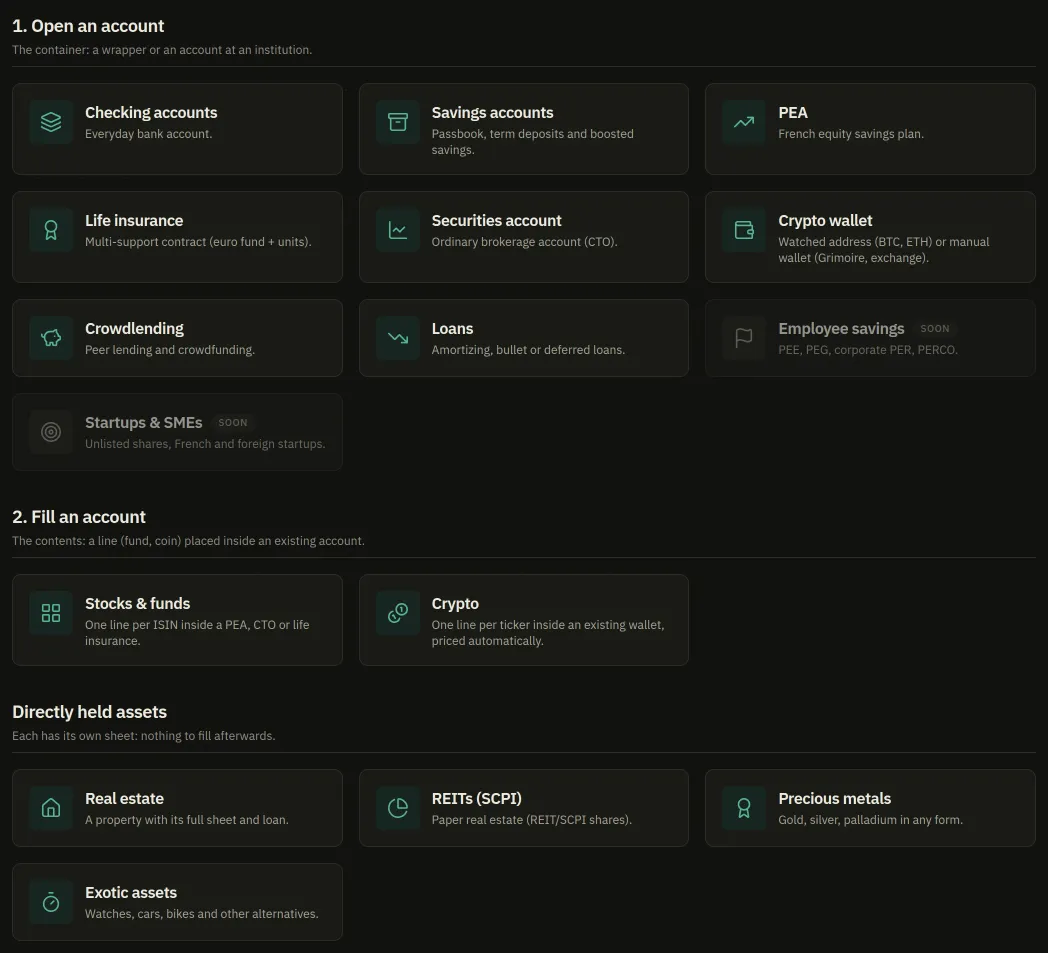
- Open an account: the container, held at an institution. Ten tiles, from a current account to a loan; two of them, Employee savings and Startups & SMEs, carry a Soon badge and cannot be clicked.
- Fill an account: a line (a fund, a coin) placed inside a container that already exists. These two tiles are useless until an account is open.
- Directly held assets: a property, REIT shares, metals, a watch. Each is its own sheet, with nothing to fill afterwards.
A container that holds securities — a PEA, a securities account, a life insurance — is called a wrapper throughout this site, and the application says envelope for the same object. Two words, one thing, and you will meet both.
Fill the form
Section titled “Fill the form”-
Click the tile for your type. The address becomes
/ajouter/pea, for instance, and the type is already chosen: you cannot pick the wrong wrapper on the way. -
Name: what you will read everywhere afterwards. Two accounts may carry the same name, but the JSON export cross-references accounts by name, so two “Livret A” are indistinguishable when that file is restored. Give them distinct names.
-
Institution: optional. It is what groups platform fees together.
-
The third box asks for an amount, and its label changes with the type. On a PEA it does not ask what you would expect; the next page is about that one box.
-
Add.
What happens next
Section titled “What happens next”The form stays open: it does not carry you off to the account it just created, it leaves
you free to chain a second one. A line under the fields names what was created, “Livret
A added. It is now part of your net worth.”, and offers a See my accounts link to
/patrimoine.
The account then appears under a category you never chose, because it is deduced from the type: a PEA files under Stocks & funds, a passbook under Savings accounts, a loan under Loans / liabilities.