
Operations
Your operations (/operations), on the tab bar of the wealth screen, is one ledger for
every payment in and out, across every account. An operation always sits on an account, so
the first one has to exist before the ledger does.
Recording one
Section titled “Recording one”New operation opens a form: the account, the date, the amount, the label, a type and a category, then optionally a fee, a tax and a note. The sign is the direction: a negative amount is money out, as the field’s own placeholder says. Nothing fills the form in for you: Badlen connects to no bank, and the only other way in is the import route, driven from outside the browser.
Reading the list
Section titled “Reading the list”Operations load 200 at a time, newest first, and Load the next ones fetches the rest. The header counts what is loaded against the total, so a page showing 200 of 5,304 says so.
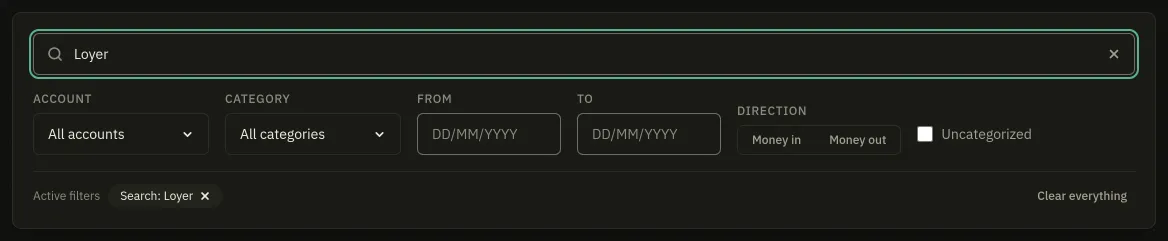
Six filters narrow it:
| Filter | What it takes |
|---|---|
| Search | A bank label or a note: plumber, invoice 2026-114 |
| Account | One account, or all of them |
| Category | One category; a parent also brings back what is filed under its subcategories |
| Uncategorized | Only what is filed nowhere |
| From / To | A period. An end before its start is refused, with a button to clear it |
| Direction | Money in, or money out |
Each active filter becomes a chip above the table, removable one at a time, with Clear everything beside them. A search that matches nothing says so and offers to clear the filters, which is not the same screen as having no operations at all.
Every row carries a category dropdown, a note, Edit and Delete.
Categorize automatically
Section titled “Categorize automatically”It runs in two layers: your own rules first, in priority order, then the built-in keyword set. The built-in layer refuses to file money going out under an income category; your own rules are applied as written, because you chose them. When it is done it says how many operations it filed, or that there was nothing to file.
Rules are written on the Categories tab, which Categories and rules covers.
Movements are not operations
Section titled “Movements are not operations”An account’s Movements tab lists three different things: cash operations like these, dated buy and sell orders on a line, and the change between two balances you typed. The third is not an operation and Badlen cannot know what it was, so it asks: a passbook that went from 7,500 to 8,000 may have earned 500 or received a transfer. One click on Interest or Deposit settles it, and clicking the taken word again takes it back.