
Export your data
Settings → Data → Your data. One press gives you a file holding everything this account has: accounts, holdings, balances, operations, lots, categories, rules, your investor questionnaire, your preferences, your course progress, and the three tables a running instance only half rebuilds: the daily net worth points, the price history and the achievement dates.
Pick the shape first
Section titled “Pick the shape first”Above the button, two boxes ask which file you want, and each lists what its file holds and what it leaves behind. The plain one is picked when the page opens, so taking it is a decision made in front of the other rather than a step skipped.
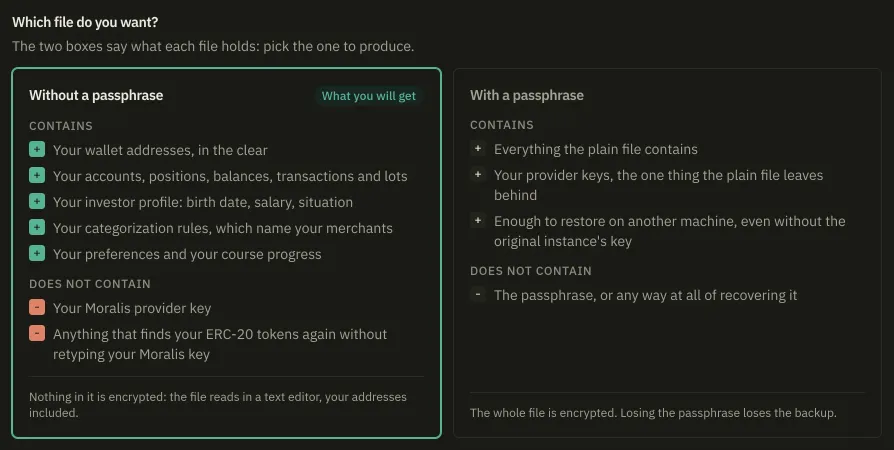
Without a passphrase gives you readable, editable JSON. It opens in a text editor, which is the point of it, and that includes your wallet addresses: they are not secrets and they travel in both shapes. It carries no provider API key.
With a passphrase reveals a field under the box and changes two things at once. The file additionally carries your provider API keys, and the whole file is encrypted, addresses included. The passphrase is between 10 and 400 characters.
An empty field with the sealed box picked stops the export rather than quietly producing a plain file. The two ways to end up with something readable are both deliberate.
The name says which you got: badlen-export-<date>_<time>.json, or
badlen-export-<date>_<time>.chiffre.json when a passphrase sealed it. Six months later in a
folder, that marker is the only thing that tells them apart.
What an export never carries
Section titled “What an export never carries”- Your API keys. A key is shown once when issued; a restored hash would name a secret nobody holds. Issue new ones.
- Your second factor, its secret and its recovery codes. A restored account has 2FA off, and turning it back on means enrolling afresh.
- Your provider API keys, in a plain file only. Export with a passphrase to carry them.
A restore names all of these every time, so this is not something to remember.
Scope and format
Section titled “Scope and format”A script can ask for less: GET /api/data/export?scope=personal leaves out those same three
tables and nothing else. A request naming no scope gets everything, and any other word is
refused with a 400 naming the two. The sealed file goes through POST /api/data/export
instead, because a passphrase in a query string is a passphrase in your access log.
The file states its format in schemaVersion: this build writes 4 and reads 1 to 4, turning
anything else away whole rather than half-reading it.
The import control is not a button
Section titled “The import control is not a button”Restoring goes through Import a file, beside the export button. It is a file picker wearing a label, not a button, and it opens your file chooser when you press it. There is no drop zone and no second screen. From the keyboard it is an ordinary tab stop, and Enter or Space opens the chooser.
A file over 25 MB is refused before it is read. An encrypted one is recognised on sight and asks for its passphrase before anything is written.
Restoring an export covers what the restore merges, what it prints back, and what to do if it was interrupted halfway.